Christmas Bird Count history report system |  |
Christmas Bird Count history report system | |
All the generated pages use the stylesheet in Section 60, “The CSS-2 stylesheet”.
The term rule is confusing in this context because it has two senses. A CSS rule is a command regarding the styling of an XHTML element. But a rule, in typesetting parlance, means a solid (ruled) line, because originally it was drawn with a ruler. What the author calls a ruled table, others might call a gridded table. The CSS concept of solid borders are used to implement ruled tables by specifying borders around each cell.
At design time, the question arises: what code applies the styles to a given XHTML element? Here are the author's design guidelines.
The principle of separation of concerns, applied here, implies that styling of an element should be done by the entity most directly concerned with that level of structure.
This problem arose when styling rows of the detail
table so that certain rules are thickened in order to
group cells visually. In practice, styling that
pertains to a specific cell is applied by the class
that represents that cell. For example, Section 42, “class CensusCell: Accumulator for counts of
individual birds” applies the
characteristic background color to census cells.
Styling that is managed at the next higher level is
applied there. Because instances of the CensusRow class manage the construction of
the entire row, that is where row-level decorations
should be applied, such as thickened horizontal rules
above some rows, and thickened horizontal rules
between some columns.
We assume a minimal CSS-2 rendering. In particular, we assume that browsers can deal with elements that are marked up with multiple CSS classes.
Your author is not in complete mastery of the rules that apply when two style features collide (e.g., two different classes specify a background color).
However, this feature is mainly used to make certain
ruled lines between table cells thicker, and in that
case the relevant principle is that more specific
styles have priority over more general styles. In
particular, if a table cell has one rule for
“border-width: 1px 1px 1px 1px;”, but another of the cell's classes
specifies “border-left-width:
3px;”, the left border will be 3
pixels thick and the rest will be 1.
Given these principles, how do we combine multiple CSS classes for the same XHTML element when they are applied at different locations in the code?
The convention we adopt is that the .html() method for the lower-level
(contained) element accepts an optional argument
addCss that supplies zero or more
additional CSS classes that are applied to the
generated element, in addition to any classes that
are always applied to that element.
The addCss argument follows the
convention discussed in Section 14.2, “class-dict”. You can construct
a class-dict item for a single class
using et.CLASS(). CSS classes from
any number of class-dict items can be
combined using Section 59, “combineCss(): Combine CSS classes from
different sources”.
For example, a call to the CensusCell.html() method will normally
produce a td element with a class='cc' attribute.
Now suppose that a particular cell is the first cell
in a group of columns (that is, the column number is
an exact multiple of COL_GROUPING), so we need to
thicken the left border to set off the column group
visually.
The CSS class that thickens the left border is 'cl'. So a call to CensusCell.html(addCss=CLASS('cl'))
would produce a td element with class='cc cl'.
Here is a screen shot of a test XHTML page that shows how to place a thick rule around the entire table, and thin rules inside it with thicker rules before every second row and fourth column.
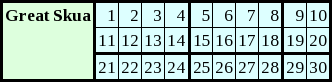
And here is the actual HTML with an embedded stylesheet.
The border-collapse: collapse; rule is
essential for sane design of ruled tables: it specifies
that the border between any two cells will be the thicker
of the borders specified by adjacent cells.
Suppose we want to group cells into groups of
R rows and C
columns. All we have to do is add class topper to every cell whose row number is a
multiple of R, and add class
lefter to every cell whose column number
is a multiple of C.
<html xmlns='http://www.w3.org/1999/xhtml'>
  <head>
    <title>Thick rules test</title>
    <style type='text/css'>
      table.census-table
      { border-collapse: collapse; border: 3px solid black; }

      th.row-label
      { text-align: left; background: #ddffdd; /* pale green */
        border: 3px solid black;
        padding: 2px; */ }

      td.d
      { border: 1px solid black; background: #ddffff; /* pale cyan */
        padding: 2px; text-align: right; }

      td.topper { border-top-width: 3px; }

      td.lefter { border-left-width: 3px; }
    </style>
  </head>
  <body>
    <h1>Thick rules test</h1>
    <table class='census-table'>
      <tr>
        <th class='row-label' rowspan='3' valign='top'>Great Skua</th>
        <td class='d topper lefter'>1</td>
        <td class='d topper'>2</td>
        <td class='d topper'>3</td>
        <td class='d topper'>4</td>
        <td class='d topper lefter'>5</td>
        <td class='d topper'>6</td>
        <td class='d topper'>7</td>
        <td class='d topper'>8</td>
        <td class='d topper lefter'>9</td>
        <td class='d topper'>10</td>
      </tr>
      <tr>
        <td class='d lefter'>11</td>
        <td class='d'>12</td>
        <td class='d'>13</td>
        <td class='d'>14</td>
        <td class='d lefter'>15</td>
        <td class='d'>16</td>
        <td class='d'>17</td>
        <td class='d'>18</td>
        <td class='d lefter'>19</td>
        <td class='d'>20</td>
      </tr>
      <tr>
        <td class='d topper lefter'>21</td>
        <td class='d topper'>22</td>
        <td class='d topper'>23</td>
        <td class='d topper'>24</td>
        <td class='d topper lefter'>25</td>
        <td class='d topper'>26</td>
        <td class='d topper'>27</td>
        <td class='d topper'>28</td>
        <td class='d topper lefter'>29</td>
        <td class='d topper'>30</td>
      </tr>
    </table>
  </body>
</html>