Python 2.7 quick reference |  |
Python 2.7 quick reference | |
These functions work on values of the four sequence
types: int, unicode, tuple, and list.
These operators apply to sequences.
S1+S2
Concatenation—for two sequences S1S2S1S2
>>> "vi" + "car"
'vicar'
>>> [1,2,3]+[5,7,11,13]+[15]
[1, 2, 3, 5, 7, 11, 13, 15]
>>> ('roy', 'g')+('biv',)
('roy', 'g', 'biv')
S*n
For a sequence SnSn
>>> 'worra'*8
'worraworraworraworraworraworraworraworra'
>>> [0]*4
[0, 0, 0, 0]
>>> (True, False)*5
(True, False, True, False, True, False, True, False, True, False)
x in S
Is any element of a sequence Sx
For convenience in searching for substrings, if the
sequence to be searched is a string, the xTrue if xS
>>> 1 in [2,4,6,0,8,0]
False
>>> 0 in [2,4,6,0,8,0]
True
>>> 'a' in 'banana'
True
>>> 3.0 in (2.5, 3.0, 3.5)
True
>>> "baz" in "rowrbazzle"
True
x not in S
Are all the elements of a sequence Sx
>>> 'a' not in 'banana'
False
>>> 'x' not in 'banana'
True
S[i]
Subscripting: retrieve the isiSIndexError exception is raised.
>>> 'Perth'[0]
'P'
>>> 'Perth'[1]
'e'
>>> 'Perth'[4]
'h'
>>> 'Perth'[5]
Traceback (most recent call last):
  File "<stdin>", line 1, in <module>
IndexError: string index out of range
>>> ('red', 'yellow', 'green')[2]
'green'
S[i:j]
Slicing: For a sequence SijSij
The values used in slicing refer to the positions between elements, where position zero is the position before the first element; position 1 is between the first and second element; and so on.
You can also specify positions relative to the end of a sequence. Position -1 is the position before the last element; -2 is the position before the second-to-last element; and so on.
You can omit the starting position to obtain a slice starting at the beginning. You can omit the ending position to get all the elements through the last.
For example, here is a diagram showing three slices
of the string 'abcdef'.
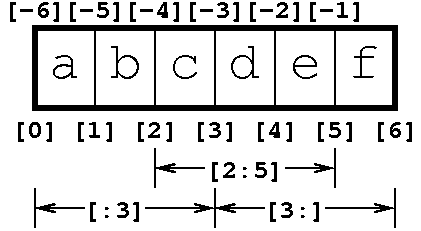
>>> 'abcdef'[2:5]
'cde'
>>> 'abcdef'[:3]
'abc'
>>> 'abcdef'[3:]
'def'
>>> (90, 91, 92, 93, 94, 95)[2:5]
(92, 93, 94)
S[i:j:k]
You can use a slice expression like this to select
every k
>>> teens = range(13,20)
>>> teens
[13, 14, 15, 16, 17, 18, 19]
>>> teens[::2]
[13, 15, 17, 19]
>>> teens[1::2]
[14, 16, 18]
>>> teens[1:5]
[14, 15, 16, 17]
>>> teens[1:5:2]
[14, 16]